Presigned URLs
Core Architecture
The Anti-Patterns
- Proxying Streams through App Servers: Routing large file (GBs) uploads through your backend uses server RAM, causes network bottlenecks, and prevents horizontal scaling.
- Exposing IAM Credentials: Embedding long-lived secrets in the frontend risks credential theft and bucket compromise.
The Presigned URL Solution
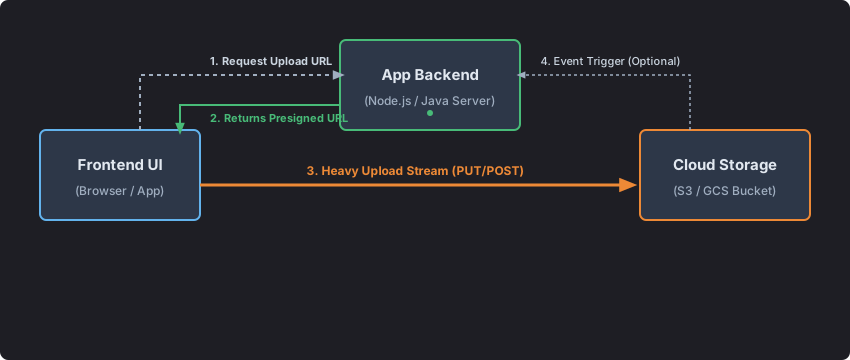
- A Presigned URL separates the Control Plane (auth and policy generation) from the Data Plane (file upload/download).
- It gives browsers or mobile clients a temporary bearer token to talk directly to private object storage.
Anatomy & Cryptographic Nature
- The backend SDK generates a presigned URL locally, without extra network calls.
- It uses the server's IAM keys to compute an HMAC-SHA256 signature over:
- Resource Path: bucket + key (e.g.,
/users/42/avatars/pic.png) - **HTTP Method: **
GET,PUT,POST,DELETE - Expiration:
X-Amz-Expires
- Resource Path: bucket + key (e.g.,
- Any tampering with the URL or query parameters will fail verification and return
403 Forbidden.
High-Volume Scaling & Rate-Limiting
- Object storage scales, but AWS S3 still limits requests per prefix to 3,500 PUT/POST/DELETE and 5,500 GET per second.
CDN for Distributed Access
- For viral or global content, place a CDN like CloudFront or Cloudflare in front of the bucket.
- Replace S3 Presigned URLs with CDN signed URLs or cookies to serve cached data from edge locations.
- The origin bucket handles only cache misses, avoiding storage request throttling.
Production Security Guardrails
Presigned URLs are bearer tokens, so protect them with layered controls:
A. Object Key Isolation
- Do not accept raw paths or filenames from the frontend.
- Use intent-based requests (e.g.
avatar) and build a sanitized storage key on the backend:const secureKey = 'users/' + userId + '/uploads/' + randomUUID() + '.png';
B. Size Limits with Presigned POST Policies
- Use a Presigned POST Policy to enforce upload size limits, for example:
["content-length-range", 1024, 5242880]
- This blocks oversized attempts before the upload starts.
C. Strict Content-Type Binding
- Bind the signature to the declared
Content-Type. - If the header changes to an executable type, storage rejects the upload.
D. Quarantine + Scanning Pipeline
- Upload to an unverified Quarantine Bucket.
- Trigger a serverless scan (e.g. AWS Lambda + ClamAV).
- Move clean files to production and delete malware.
Enterprise-Scale Multipart Uploads
- For files over 5 GB or unstable networks, use Multipart Uploads.
Flow
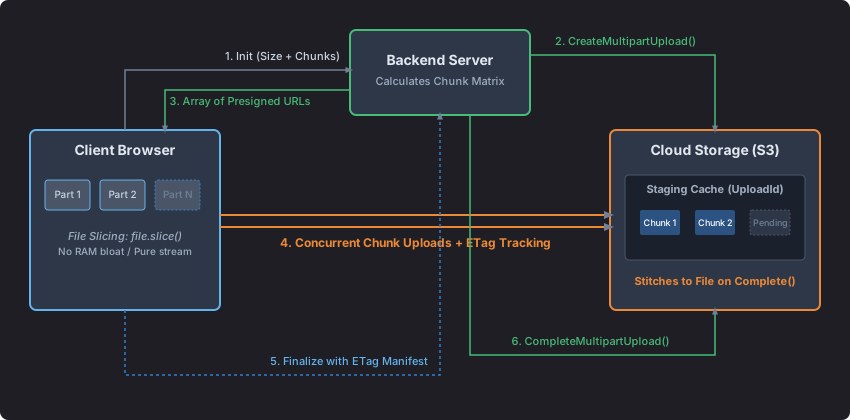
- Client asks backend to start a large upload.
- Backend calls
CreateMultipartUpload()and gets anUploadId. - Backend returns signed URLs for each part.
- Client uploads parts directly to storage.
- Storage returns ETags for each part.
- Client sends part numbers and ETags back to backend.
- Backend calls
CompleteMultipartUpload(). - Storage assembles the parts.
Resuming Failed Uploads
- If the upload breaks, query active parts with
ListPartsCommand. - Generate new short-lived URLs only for missing parts.
- Upload the remaining parts and complete the upload.
HTML5 Blob Optimization
- Use
Blob.prototype.slice()so browser uploads stream from disk without loading whole chunks into RAM.
Operational Caveats
- 5 MB minimum part size: All multipart chunks must be at least 5 MB except the final part.
- Zombie part leak: Configure lifecycle policies to delete incomplete multipart uploads after a window (e.g. 7 days).
- CORS: Allow
PUT,POST, andGETfrom your app origin for direct browser uploads. - IAM expiration: When using temporary credentials, the presigned URL expires when the parent token rotates, even if
expiresInis longer.