Peformance Optimized large list renderings
· 2 min read

Problem
Rendering large lists (hundreds or thousands of items) in UI can lead to major performance issues:
- Very large DOM tree → slow layout & rendering
- Laggy scrolling / high memory usage
- Especially bad on low-end devices or mobile
Why it’s bad
Mounting thousands of DOM elements at once is computationally expensive and can cause unresponsive UI, slow paints, and heavy memory usage.
Recommended Solutions
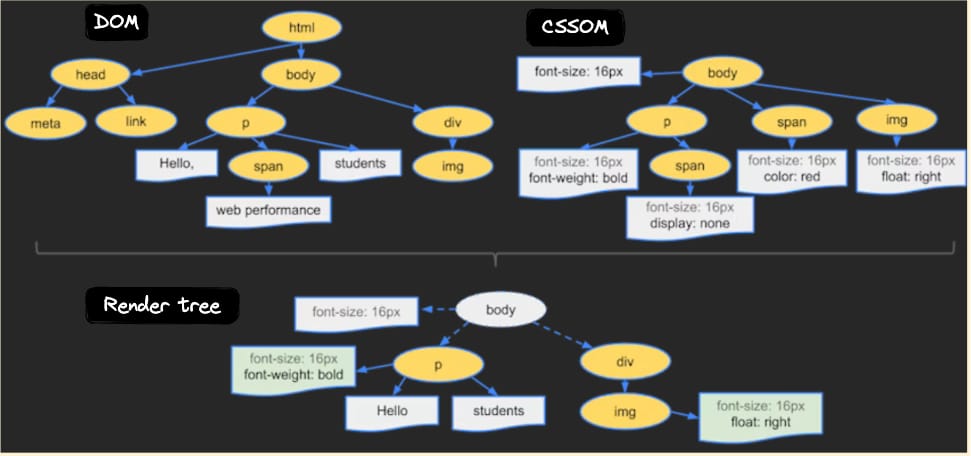
1. Keep the Render Tree Small
Minimize unnecessary DOM elements (e.g. avoid extra <div>s). A leaner render tree reduces layout work and improves performance.
2. Infinite Scroll (Lazy-loading)
- Render only enough items to fill the viewport initially.
- As user scrolls, dynamically load/render more items.
- Pros: Large performance improvement (less initial load, faster UI).
- Cons: Browser’s native “Ctrl+F / find in page” won’t work for unrendered items — need custom search/filter UI if necessary.
3. Windowing / Virtualization
- Only render items visible in viewport + a small buffer.
- Unmount items that scroll out of view.
- Pros: Constant memory usage, smooth scrolling even for very large lists.
- Cons: Same like Infinite scroll
4. DIY Lazy-loading (without libraries)
- Use
IntersectionObserver. - Initially render items enough to fill viewport.
- Place a dummy “sentinel” at bottom.
- When sentinel becomes visible, fetch/render next batch of items.
Tradeoffs
- Native page search might break (because not all items are in DOM).
- Adding/removing DOM nodes during scroll might cause slight rendering delays (still much lower than full-list rendering).
- Balance between user experience (smooth scroll, fast load) and features (search, accessibility).