Load Balancer and Proxies
Load Balancer
- Distributes incoming client requests to computing resources such as application servers and databases.
- Effective for:
- Preventing resource overload
- Preventing requests from going to unhealthy servers
- Eliminating single points of failure
- Zero-downtime deployments through connection draining.
- Fault tolerance by automatically removing unhealthy instances.
Types of Load Balancers
Hardware Load Balancer
- Physical devices designed for high-speed traffic distribution.
- Expensive and used in enterprise setups.
- Example: Citrix ADC
Software Load Balancer
- Applications or services that run on standard servers.
- Cost-effective and flexible.
- Example: HAProxy, Nginx
Cloud Load Balancer
- Managed service provided by cloud providers.
- Scalable and easy to integrate.
- Example: Google Cloud LB, Amazon Elastic LB
Types Based on Functionalities
Layer 4 (Transport Layer) LB
- Operates at the TCP/UDP layer.
- Routes traffic based on IP addresses and ports.
- Very fast, Low latency and handles millions of connections
- Example: AWS Network Load Balancer (NLB).
Layer 7 (Application Layer) LB
- Operates at the HTTP/HTTPS layer.
- Makes routing decisions based on URL, headers, cookies, etc.
- Example: AWS Application Load Balancer (ALB).
Deep Dive: Layer 4 vs Layer 7
- Layer 4 (L4) load balancers forward packets without inspecting HTTP semantics. They are extremely fast and handle millions of connections with low latency. Use L4 when you need raw throughput (TCP/UDP), protocol-agnostic routing, or TLS passthrough.
- Layer 7 (L7) load balancers understand HTTP semantics (methods, headers, cookies, paths). They can perform intelligent routing (path-based, header-based), host-based virtual hosting, and perform request/response transformations. L7 incurs more CPU and memory overhead but enables richer features like blue/green routing, canary releases, and A/B testing.
Tradeoffs:
- L4: lower latency, simpler, fewer features. Good for generic TCP-based services (databases, SMTP, custom protocols) or when terminating TLS elsewhere.
- L7: higher flexibility, richer routing, observability, and security controls. Use for web traffic, APIs, and microservices.
Types of Load Balancing Algorithms
Round Robin
- A request is sent to the first server in the list.
- The next request is sent to the second server, and so on.
- After the last server in the list, the algorithm loops back to the first server.
- Preferred only when all servers have the same processing capabilities; can cause issues if servers have different capabilities.
Weighted Round Robin
- Each server is assigned a weight based on processing power or available resources.
- Servers with higher weights receive a proportionally larger share of incoming requests.
- More complex to implement and does not consider current server load or response time.
IP Hashing
- Calculates a hash value from the client’s IP address to determine which server to route the request to.
- Used for session persistence, as requests from the same client are always directed to the same server.
- Can lead to uneven load distribution if certain IP addresses generate more traffic than others.
- Lacks flexibility if a server goes down, as the hash mapping may need to be reconfigured.
Least Connections
- Monitors the number of active connections on each server.
- Assigns incoming requests to the server with the least number of active connections.
Least Response Time
- Monitors the response time of each server.
- Assigns incoming requests to the server with the fastest response time.
- May not consider other factors such as server load or connection count.
Random
- Requests are distributed randomly among available servers.
- Surprisingly effective when all servers have similar capacity and traffic volume is high.
Power of Two Choices
- Randomly selects two servers.
- Chooses the server with the lower current load.
- Provides near-optimal load distribution while requiring very little computation.
- Widely used in distributed systems due to its simplicity and effectiveness.
Consistent Hashing
- Maps both servers and requests onto a logical hash ring.
- Each request is routed to the nearest server in the ring.
- When servers are added or removed, only a small portion of requests need to be remapped.
- Commonly used in distributed caches such as Redis Cluster, Cassandra, and CDNs.
Disadvantages of Load Balancers
- A single load balancer is a single point of failure; configuring multiple load balancers increases complexity.
- The load balancer can become a performance bottleneck if it lacks resources or is not configured properly.
Health Checks and Failover
- Active health checks: the load balancer periodically probes backends (HTTP GET, TCP connect, application-specific endpoints) and removes unhealthy targets from the pool.
- Passive health checks: the LB observes connection errors or high latency and temporarily removes a backend after failures.
- Health check design: keep lightweight endpoints (e.g.,
/health), check essential subsystems (DB connectivity, cache reachability), and ensure checks are fast and deterministic.
Connection draining / graceful shutdown:
- When removing an instance, the LB should drain existing connections and stop sending new ones for a short window to allow in-flight requests to finish. This prevents interrupted flows during deployments.
Sticky Sessions (Session Affinity)
- By default, consecutive requests from the same client may be routed to different backend servers.
- This becomes a problem if session information is stored in server memory.
- Although sticky sessions simplify session management, they create uneven load distribution and make scaling difficult.
- Modern applications usually externalize session storage using Redis or databases so that any server can process any request.
- Solutions:
- Cookie-based affinity (for L7)
- With this method, the load balancer takes a peek at the HTTP traffic. When a user connects for the first time, the load balancer chooses a server and sticks a special cookie into the user's web browser response.
- How it works: On every subsequent click or page load, the user's browser automatically sends that cookie back. The load balancer reads the cookie, recognizes which server it points to, and routes the request there.
- Source IP hashing (for L4)
- Session ID hashing (for L7)
- Cookie-based affinity (for L7)
SSL/TLS Termination
- The load balancer terminates the client's HTTPS connection, decrypts the traffic, and forwards plain HTTP (or re-encrypted HTTPS) to backend servers.
- Some organizations prefer TLS Passthrough, where encrypted traffic is forwarded directly to backend servers without decryption to provide end-to-end encryption.
- Benefits:
- Reduces CPU usage on backend servers.
- Centralizes certificate management.
- Simplifies certificate rotation.
Connection Pooling
Instead of opening a new TCP connection for every request, load balancers often reuse persistent connections to backend servers.
Benefits:
- Lower latency
- Reduced TCP handshake overhead
- Better CPU utilization
- Lower connection churn
Connection Draining (Graceful Shutdown)
- Connection draining is a mechanism that allows a server to gracefully stop serving traffic before it is removed from the load balancer (e.g., during deployments, scaling, or maintenance).
Instead of terminating the server immediately, the load balancer:
- Stops sending new requests to the server.
- Allows existing requests and connections to complete.
- Removes the server only after all active connections finish or a configured timeout is reached.
This prevents interrupted requests, failed file uploads, dropped WebSocket connections, and incomplete transactions, enabling zero-downtime deployments.
Example Flow:
Server enters Draining
        │
        ▼
No new requests
        │
        ▼
Existing requests finish
        │
        ▼
Active connections = 0
        │
        ▼
Server removed safely
Note: Connection draining is used for planned server removal, whereas health checks are used to detect unexpected server failures.
Fault Tolerance by Automatically Removing Unhealthy Instances
-
A load balancer continuously monitors the health of backend servers using health checks (e.g., HTTP requests to
/health, TCP connection checks, or custom application checks). -
If a server becomes unhealthy due to crashes, high error rates, or network issues, the load balancer automatically removes it from the pool of available servers and stops routing new requests to it.
-
Once the server recovers and starts passing health checks again, the load balancer automatically adds it back into the pool.
Example Flow:
          Load Balancer
         /      |      \
      Server1 Server2 Server3
                │
                ▼
        Health Check Fails
                │
                ▼
      Mark Server2 Unhealthy
                │
                ▼
 Stop sending new requests to Server2
                │
                ▼
  Traffic is routed to Server1 & Server3
                │
                ▼
     Server2 Recovers and Passes Health Check
                │
                ▼
     Add Server2 back to the pool
Proxy Servers
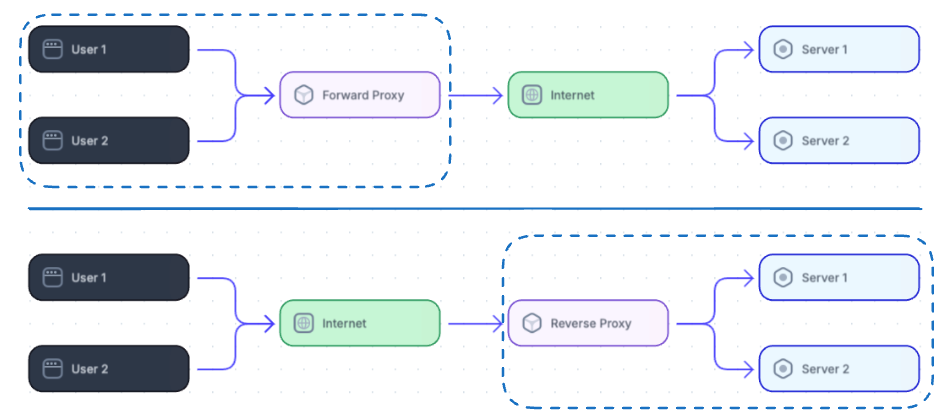
Proxy (Forward Proxy) Server
- A proxy (or forward proxy) is a server that acts on behalf of clients on a network.
- When you send a request (e.g., opening a webpage), the proxy intercepts it, forwards it to the target server, and relays the server’s response back to you.
How a Proxy Server Handles a Request
- The user types a website URL into their browser. The request is intercepted by the proxy server instead of going directly to the website.
- The proxy server examines the request to decide if it should forward, deny, or serve a cached copy.
- If the proxy forwards the request, it contacts the target website. The website sees only the proxy server’s IP, not the user’s.
- When the target website responds, the proxy receives the response and relays it to the user.
Benefits
- Privacy and Anonymity: Proxy servers hide your IP address so the destination server does not know your real location.
- Access Control
- Security: Proxies can filter out malicious content and block suspicious sites.
- Improved Performance: Caches frequently accessed content.
Implementation notes
- Forward proxies often sit inside private networks, enforce corporate security policies, and can inject headers, sanitize requests, or block content. They may integrate with authentication (LDAP, Kerberos).
Real World Applications
- Bypassing Geographic Restrictions: For example, a server in the US gives data specific to US users, but you want the same data from India. You call a proxy server set up in the US, which calls the main server and returns the desired response.
- Speed and Performance Optimization (Caching): Uses caching for frequently accessed data and TTL to deal with stale data.
Reverse Proxy
- A reverse proxy is a web server that centralizes internal services and provides unified interfaces to the public. Requests from clients are forwarded to a server that can fulfill them before the reverse proxy returns the server's response to the client.
- Think of a reverse proxy as a gatekeeper. Instead of hiding clients from the server, it hides servers from clients.
- Allowing direct access to servers can pose security risks like DDoS attacks.
How a Reverse Proxy Handles a Request
- The client makes a request to the reverse proxy server, which routes it to the appropriate backend server based on load balancing and availability.
- The backend server processes the request and sends the response back to the reverse proxy.
- The reverse proxy relays the response to the client.
Benefits
- Enhanced security: Reduces risk of attacks on backend servers as they are not exposed.
- Load Balancing
- Caching static content
- SSL Termination: Decrypts incoming requests and encrypts server responses so backend servers do not have to perform these expensive operations. Removes the need to install X.509 certificates on each server.
- Web Application Firewall (WAF): Can inspect incoming requests, acting as a firewall to detect and block malicious traffic.
Real World Applications
- Cloudflare’s reverse proxy is widely used by global websites and applications to boost speed, security, and reliability.
- Its Web Application Firewall (WAF) and DDoS protection block malicious traffic before it reaches the site’s servers, safeguarding against attacks and improving uptime.
Disadvantages
- Complexities
- A single reverse proxy can introduce a single point of failure.
API Gateway
- An API Gateway is a specialized reverse proxy that acts as a single entry point into a system of microservices.
- It's not just a traffic router, it enforces security, policies, and orchestration logic.
Features
- Routing (based on paths, headers, etc.)
- Authentication & Authorization (JWT, OAuth2)
- Rate limiting & throttling
- Request/response transformation
- Logging, monitoring, tracing
- API versioning and quota management
When to pick an API Gateway
- Use an API Gateway when you need centralized API management: authentication, quota enforcement, request validation, protocol translation (gRPC↔HTTP/JSON), or cross-cutting concerns (metrics, tracing).
- Avoid unnecessary gateway complexity for simple monoliths; a reverse proxy may suffice.
Clarification
- VPN and proxy are not the same. VPN encrypts all internet traffic, while a proxy only forwards specific requests.
Load Balancer vs Reverse Proxy
- Deploying a load balancer is useful when you have multiple servers. Load balancers route traffic to a set of servers serving the same function.
- Reverse proxies can be useful even with just one web server or application server, providing the benefits described above.
Key Differences
| Feature | Load Balancer | Reverse Proxy | API Gateway |
|---|---|---|---|
| Purpose | Distribute traffic | Forward requests | Manage and route API calls |
| OSI Layer | Layer 4 or 7 | Layer 7 | Layer 7 |
| Authentication/AuthZ | ❌ No | ⚠️ Maybe | ✅ Yes |
| Rate Limiting | ❌ No | ⚠️ Maybe | ✅ Yes |
| Request Transformation | ❌ No | ⚠️ Limited | ✅ Yes |
| SSL Termination | ✅ Yes | ✅ Yes | ✅ Yes |
| Awareness of Microservices internal | ❌ No | ❌ No | ✅ Yes |
| Use Case | Scalability | Security, routing | Microservice orchestration |
Where sits in real world
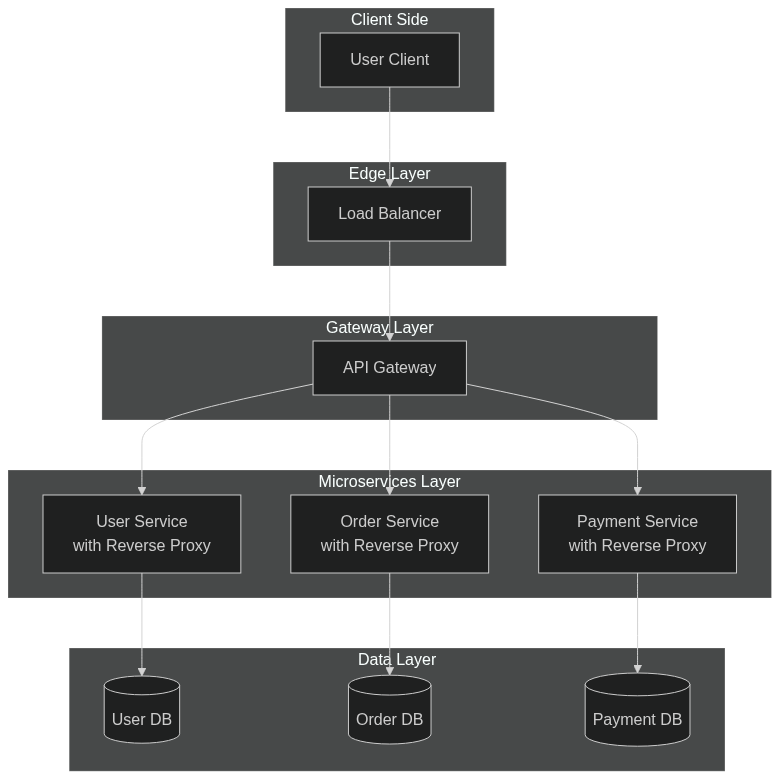
Security Considerations
- Always validate and sanitize user input at the application layer even if LB/proxy applies WAF rules.
- Keep TLS up to date and prefer TLS 1.2+/strong ciphers. Rotate certificates and automate with ACME where possible.
- Use rate limiting and CAPTCHAs for public APIs to mitigate abuse.
High-Availability Patterns
- Active-active: multiple LBs (or multi-AZ LBs) share traffic and improve capacity and resilience.
- Active-passive: a hot standby LB takes over via failover (useful for legacy setups).
- Global load balancing: DNS-based (Route 53 latency/geo routing), Anycast, or global traffic managers route users to the closest region.
Choosing the Right Components
- Static website or CDN: use CDN (CloudFront, Fastly) + origin behind LB/reverse proxy.
- Simple web app: reverse proxy (Nginx) with SSL termination and caching.
- Microservices + cross-cutting concerns: API Gateway + service mesh for east-west traffic control.